本文我们来梳理 Kafka Connector 相关的源码。
自定义 Source 和 Sink
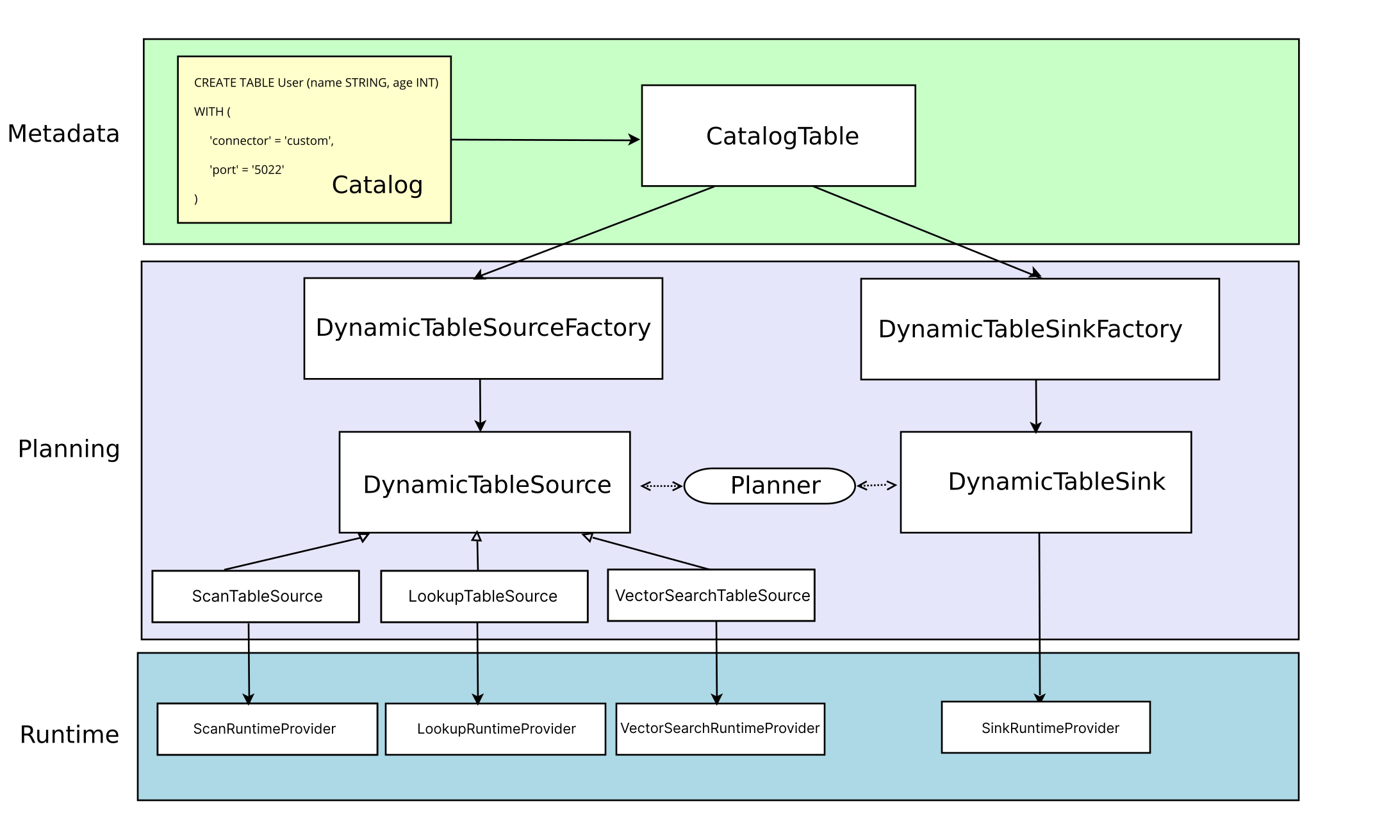
在介绍 Kafka Connector 之前,我们先来看一下在 Flink 中是如何支持自定义 Source 和 Sink 的。我们来看一张 Flink 官方文档提供的图。
这张图展示了 Connector 的基本体系结构,三层架构也非常清晰。
Metadata
首先是最上层的 MetaData,CREATE TABLE 会更新 Catalog,然后被转换为 TableAPI 的 CatalogTable,CatalogTable 实例用于表示动态表(Source 或 Sink 表)的元信息。
Planning
在解析和优化程序时,会将 CatalogTable 转换为 DynamicTableSource 和 DynamicTableSink,分别用于查询和插入数据,这两个实例的创建都需要对应的工厂类,工厂类的完整路径需要放到这个配置文件中。- META-INF/services/org.apache.flink.table.factories.Factory
在 Source 端,通过三个接口支持不同的查询能力。
- ScanTableSource:用于消费 changelog 流,扫描的数据支持 insert、updata、delete 三种类型。ScanTableSource 还支持很多其他的功能, 都是通过接口提供的。具体可以看参考这个连接
- https://nightlies.apache.org/flink/flink-docs-release-2.2/docs/dev/table/sourcessinks/#source-abilities
- LookupTableSource:LookupTableSource 不会全量读取表的数据,它在需要时会发送请求,懒加载数据。目前只支持 insert-only 变更模式。
- VectorSearchTableSource:使用一个输入向量来搜索数据,并返回最相似的 Top-K 行数据。
在 Sink 端,通过 DynamicTableSink 来实现具体的写入逻辑,这里也提供了一些用于扩展能力的接口。具体参考- https://nightlies.apache.org/flink/flink-docs-release-2.2/docs/dev/table/sourcessinks/#sink-abilities
逻辑解析完成后,会到 Runtime 层。这里就是定义几个 Provider,在 Provider 中实现和连接器具体的交互逻辑。
小结
当我们需要创建一个自定义的 Source 和 Sink 时,就可以通过以下步骤实现。
- 定义 Flink SQL 的 DDL,需要定义相应的 Options。
- 实现 DynamicTableSourceFactory 和 DynamicTableSinkFactory,并把实现类的具体路径写到配置文件中。
- 实现 DynamicTableSource 和 DynamicTableSink,这里需要处理 SQL 层的元数据。
- 提供 Provider,将逻辑层与底层 DataStream 关联起来。
- 编写底层算子,实现 Source 和 Sink 接口。
Kafka Connector 的实现
带着这些知识,我们一起来看一下 Kafka Connector 相关的源码。
Kafka Connector 代码目前已经是一个独立的项目了。项目地址是- https://github.com/apache/flink-connector-kafka
我们首先找到定义的工厂类- org.apache.flink.streaming.connectors.kafka.table.KafkaDynamicTableFactoryorg.apache.flink.streaming.connectors.kafka.table.UpsertKafkaDynamicTableFactory
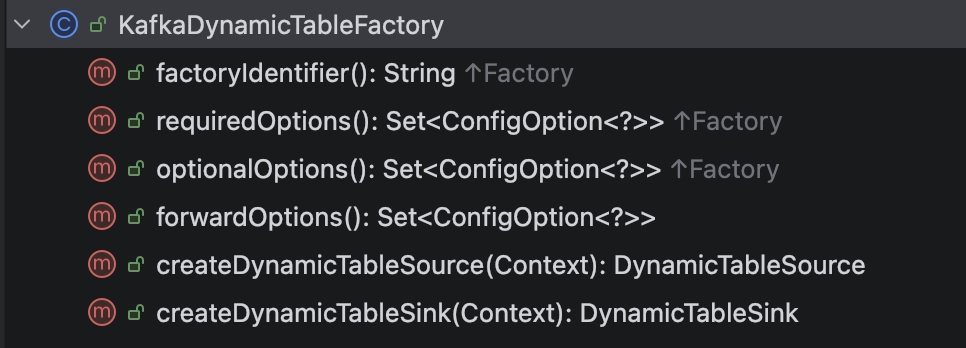
KafkaDynamicTableFactory 包含以下几个方法。
- factoryIdentifier:返回一个唯一标识符,对应 Flink SQL 中 connector='xxx' 这个配置。
- requiredOptions:必填配置集合。
- optionalOptions:选填配置集合。
- forwardOptions:直接传递到 Runtime 层的配置集合。
- createDynamicTableSource:创建 DynamicTableSource。
- createDynamicTableSink:创建 DynamicTableSink。
Source 端
工厂类的 createDynamicTableSource 方法创建了 DynamicTableSource,我们来看一下创建的逻辑。- public DynamicTableSource createDynamicTableSource(Context context) { final TableFactoryHelper helper = FactoryUtil.createTableFactoryHelper(this, context); final Optional keyDecodingFormat = getKeyDecodingFormat(helper); final DecodingFormat valueDecodingFormat = getValueDecodingFormat(helper); helper.validateExcept(PROPERTIES_PREFIX); final ReadableConfig tableOptions = helper.getOptions(); validateTableSourceOptions(tableOptions); validatePKConstraints( context.getObjectIdentifier(), context.getPrimaryKeyIndexes(), context.getCatalogTable().getOptions(), valueDecodingFormat); final StartupOptions startupOptions = getStartupOptions(tableOptions); final BoundedOptions boundedOptions = getBoundedOptions(tableOptions); final Properties properties = getKafkaProperties(context.getCatalogTable().getOptions()); // add topic-partition discovery final Duration partitionDiscoveryInterval = tableOptions.get(SCAN_TOPIC_PARTITION_DISCOVERY); properties.setProperty( KafkaSourceOptions.PARTITION_DISCOVERY_INTERVAL_MS.key(), Long.toString(partitionDiscoveryInterval.toMillis())); final DataType physicalDataType = context.getPhysicalRowDataType(); final int[] keyProjection = createKeyFormatProjection(tableOptions, physicalDataType); final int[] valueProjection = createValueFormatProjection(tableOptions, physicalDataType); final String keyPrefix = tableOptions.getOptional(KEY_FIELDS_PREFIX).orElse(null); final Integer parallelism = tableOptions.getOptional(SCAN_PARALLELISM).orElse(null); return createKafkaTableSource( physicalDataType, keyDecodingFormat.orElse(null), valueDecodingFormat, keyProjection, valueProjection, keyPrefix, getTopics(tableOptions), getTopicPattern(tableOptions), properties, startupOptions.startupMode, startupOptions.specificOffsets, startupOptions.startupTimestampMillis, boundedOptions.boundedMode, boundedOptions.specificOffsets, boundedOptions.boundedTimestampMillis, context.getObjectIdentifier().asSummaryString(), parallelism);}
获取解码格式需要用到 DeserializationFormatFactory 工厂,DeserializationFormatFactory 有多个实现类,对应了多种格式的反序列化方法。
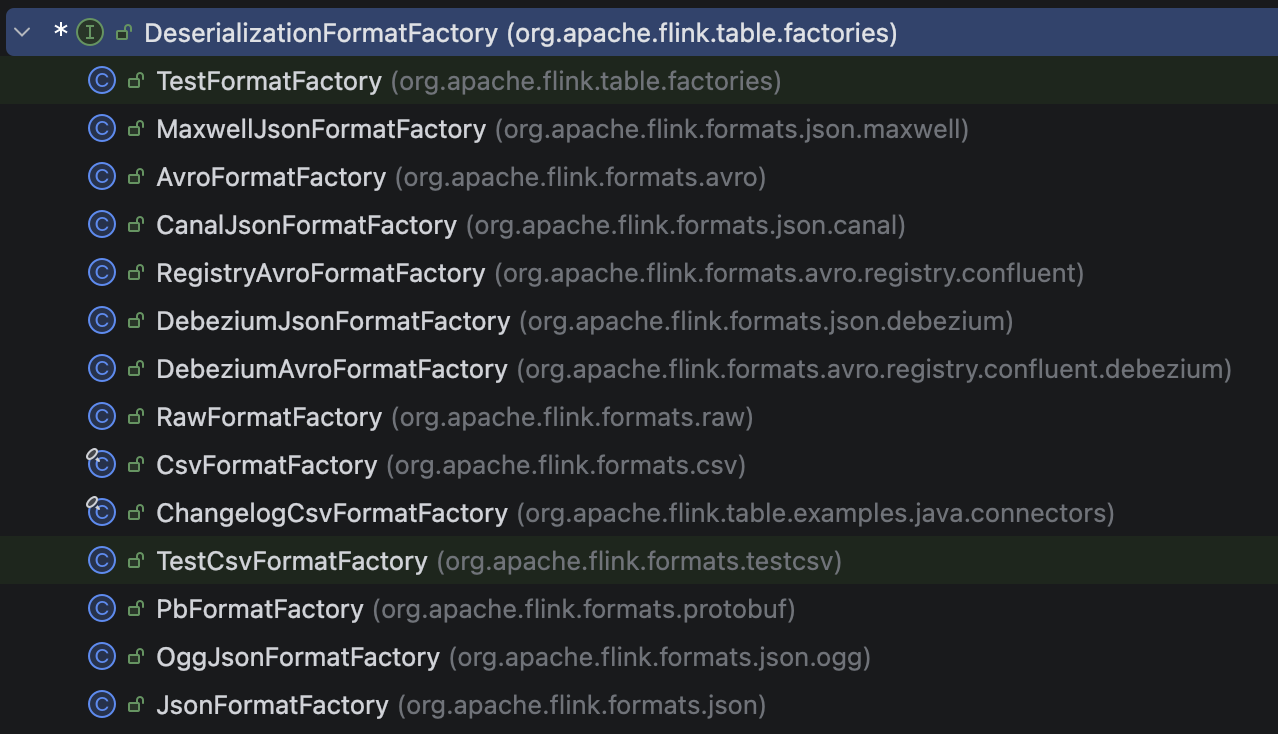
我们来看比较常见的 Json 格式的工厂 JsonFormatFactory。- public DecodingFormat createDecodingFormat( DynamicTableFactory.Context context, ReadableConfig formatOptions) { FactoryUtil.validateFactoryOptions(this, formatOptions); JsonFormatOptionsUtil.validateDecodingFormatOptions(formatOptions); final boolean failOnMissingField = formatOptions.get(FAIL_ON_MISSING_FIELD); final boolean ignoreParseErrors = formatOptions.get(IGNORE_PARSE_ERRORS); final boolean jsonParserEnabled = formatOptions.get(DECODE_JSON_PARSER_ENABLED); TimestampFormat timestampOption = JsonFormatOptionsUtil.getTimestampFormat(formatOptions); return new ProjectableDecodingFormat() { @Override public DeserializationSchema createRuntimeDecoder( DynamicTableSource.Context context, DataType physicalDataType, int[][] projections) { final DataType producedDataType = Projection.of(projections).project(physicalDataType); final RowType rowType = (RowType) producedDataType.getLogicalType(); final TypeInformation rowDataTypeInfo = context.createTypeInformation(producedDataType); if (jsonParserEnabled) { return new JsonParserRowDataDeserializationSchema( rowType, rowDataTypeInfo, failOnMissingField, ignoreParseErrors, timestampOption, toProjectedNames( (RowType) physicalDataType.getLogicalType(), projections)); } else { return new JsonRowDataDeserializationSchema( rowType, rowDataTypeInfo, failOnMissingField, ignoreParseErrors, timestampOption); } } @Override public ChangelogMode getChangelogMode() { return ChangelogMode.insertOnly(); } @Override public boolean supportsNestedProjection() { return jsonParserEnabled; } };}
了解完解码格式后,我们把视角拉回到 KafkaDynamicSource,它实现了三个接口 ScanTableSource、SupportsReadingMetadata、SupportsWatermarkPushDown。分别用于消费数据,读取元数据和生成水印。- public ScanRuntimeProvider getScanRuntimeProvider(ScanContext context) { final DeserializationSchema keyDeserialization = createDeserialization(context, keyDecodingFormat, keyProjection, keyPrefix); final DeserializationSchema valueDeserialization = createDeserialization(context, valueDecodingFormat, valueProjection, null); final TypeInformation producedTypeInfo = context.createTypeInformation(producedDataType); final KafkaSource kafkaSource = createKafkaSource(keyDeserialization, valueDeserialization, producedTypeInfo); return new DataStreamScanProvider() { @Override public DataStream produceDataStream( ProviderContext providerContext, StreamExecutionEnvironment execEnv) { if (watermarkStrategy == null) { watermarkStrategy = WatermarkStrategy.noWatermarks(); } DataStreamSource sourceStream = execEnv.fromSource( kafkaSource, watermarkStrategy, "KafkaSource-" + tableIdentifier); providerContext.generateUid(KAFKA_TRANSFORMATION).ifPresent(sourceStream::uid); return sourceStream; } @Override public boolean isBounded() { return kafkaSource.getBoundedness() == Boundedness.BOUNDED; } @Override public Optional getParallelism() { return Optional.ofNullable(parallelism); } };}
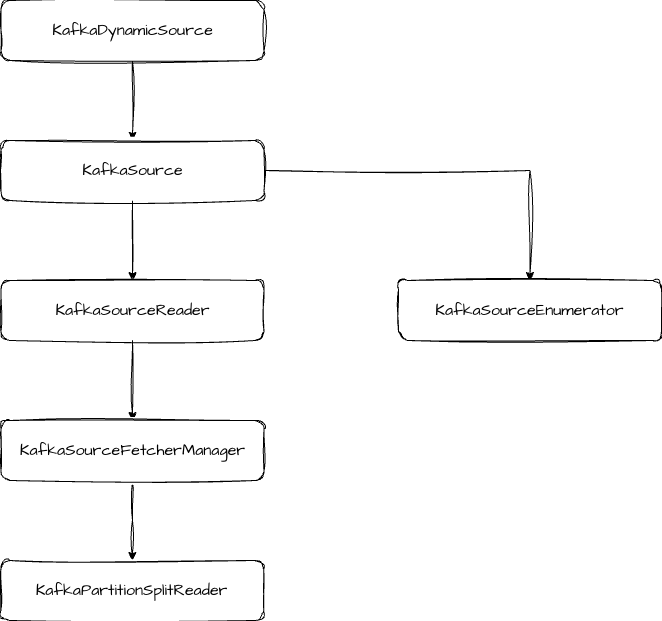
然后开始创建 KafkaSource 实例,它是 Source 的实现类,也就是执行引擎层了,这个过程会依次创建图中这些类。
KafkaSource 中主要是创建 KafkaSourceReader 和 KafkaSourceEnumerator,KafkaSourceEnumerator 是负责和分片相关的逻辑,包括分片分配和分片发现等。
KafkaSourceReader 中主要是和 State 相关的逻辑,包括触发快照和完成 Checkpoint 通知的方法。当做 Snapshot 时,会记录活跃 split 的 offset,同时将 split 作为状态提交。当 Checkpoint 完成时,会调用 KafkaSourceFetcherManager.commitOffsets 提交 offset。- public List snapshotState(long checkpointId) { List splits = super.snapshotState(checkpointId); if (!commitOffsetsOnCheckpoint) { return splits; } if (splits.isEmpty() && offsetsOfFinishedSplits.isEmpty()) { offsetsToCommit.put(checkpointId, Collections.emptyMap()); } else { Map offsetsMap = offsetsToCommit.computeIfAbsent(checkpointId, id -> new HashMap()); // Put the offsets of the active splits. for (KafkaPartitionSplit split : splits) { // If the checkpoint is triggered before the partition starting offsets // is retrieved, do not commit the offsets for those partitions. if (split.getStartingOffset() >= 0) { offsetsMap.put( split.getTopicPartition(), new OffsetAndMetadata(split.getStartingOffset())); } } // Put offsets of all the finished splits. offsetsMap.putAll(offsetsOfFinishedSplits); } return splits;}public void notifyCheckpointComplete(long checkpointId) throws Exception { LOG.debug("Committing offsets for checkpoint {}", checkpointId); ... ((KafkaSourceFetcherManager) splitFetcherManager) .commitOffsets( committedPartitions, (ignored, e) -> {...});}
KafkaPartitionSplitReader 的 fetch 方法用来消费 Kafka 的数据。- public RecordsWithSplitIds fetch() throws IOException { ConsumerRecords consumerRecords; try { consumerRecords = consumer.poll(Duration.ofMillis(POLL_TIMEOUT)); } catch (WakeupException | IllegalStateException e) { // IllegalStateException will be thrown if the consumer is not assigned any partitions. // This happens if all assigned partitions are invalid or empty (starting offset >= // stopping offset). We just mark empty partitions as finished and return an empty // record container, and this consumer will be closed by SplitFetcherManager. KafkaPartitionSplitRecords recordsBySplits = new KafkaPartitionSplitRecords( ConsumerRecords.empty(), kafkaSourceReaderMetrics); markEmptySplitsAsFinished(recordsBySplits); return recordsBySplits; } KafkaPartitionSplitRecords recordsBySplits = new KafkaPartitionSplitRecords(consumerRecords, kafkaSourceReaderMetrics); List finishedPartitions = new ArrayList(); for (TopicPartition tp : consumer.assignment()) { long stoppingOffset = getStoppingOffset(tp); long consumerPosition = getConsumerPosition(tp, "retrieving consumer position"); // Stop fetching when the consumer's position reaches the stoppingOffset. // Control messages may follow the last record; therefore, using the last record's // offset as a stopping condition could result in indefinite blocking. if (consumerPosition >= stoppingOffset) { LOG.debug( "Position of {}: {}, has reached stopping offset: {}", tp, consumerPosition, stoppingOffset); recordsBySplits.setPartitionStoppingOffset(tp, stoppingOffset); finishSplitAtRecord( tp, stoppingOffset, consumerPosition, finishedPartitions, recordsBySplits); } } // Only track non-empty partition's record lag if it never appears before consumerRecords .partitions() .forEach( trackTp -> { kafkaSourceReaderMetrics.maybeAddRecordsLagMetric(consumer, trackTp); }); markEmptySplitsAsFinished(recordsBySplits); // Unassign the partitions that has finished. if (!finishedPartitions.isEmpty()) { finishedPartitions.forEach(kafkaSourceReaderMetrics::removeRecordsLagMetric); unassignPartitions(finishedPartitions); } // Update numBytesIn kafkaSourceReaderMetrics.updateNumBytesInCounter(); return recordsBySplits;}
Sink 端
我们从工厂类中的 createDynamicTableSink 方法开始。- public DynamicTableSink createDynamicTableSink(Context context) { final TableFactoryHelper helper = FactoryUtil.createTableFactoryHelper( this, autoCompleteSchemaRegistrySubject(context)); final Optional keyEncodingFormat = getKeyEncodingFormat(helper); final EncodingFormat valueEncodingFormat = getValueEncodingFormat(helper); helper.validateExcept(PROPERTIES_PREFIX); final ReadableConfig tableOptions = helper.getOptions(); final DeliveryGuarantee deliveryGuarantee = validateDeprecatedSemantic(tableOptions); validateTableSinkOptions(tableOptions); KafkaConnectorOptionsUtil.validateDeliveryGuarantee(tableOptions); validatePKConstraints( context.getObjectIdentifier(), context.getPrimaryKeyIndexes(), context.getCatalogTable().getOptions(), valueEncodingFormat); final DataType physicalDataType = context.getPhysicalRowDataType(); final int[] keyProjection = createKeyFormatProjection(tableOptions, physicalDataType); final int[] valueProjection = createValueFormatProjection(tableOptions, physicalDataType); final String keyPrefix = tableOptions.getOptional(KEY_FIELDS_PREFIX).orElse(null); final Integer parallelism = tableOptions.getOptional(SINK_PARALLELISM).orElse(null); return createKafkaTableSink( physicalDataType, keyEncodingFormat.orElse(null), valueEncodingFormat, keyProjection, valueProjection, keyPrefix, getTopics(tableOptions), getTopicPattern(tableOptions), getKafkaProperties(context.getCatalogTable().getOptions()), getFlinkKafkaPartitioner(tableOptions, context.getClassLoader()).orElse(null), deliveryGuarantee, parallelism, tableOptions.get(TRANSACTIONAL_ID_PREFIX), tableOptions.get(TRANSACTION_NAMING_STRATEGY));}
获取编码格式用到的工厂类是 SerializationFormatFactory,我们前面介绍的 JsonFormatFactory 也实现了 SerializationFormatFactory,因此它既提供了解码格式,又提供了编码格式。编码格式用到的编码器是 JsonRowDataSerializationSchema,通过 RowDataToJsonConverters 将 RowData 转换成 JsonNode。
在 KafkaDynamicSink 的 getSinkRuntimeProvider 方法中,主要就是创建 KafkaSink 实例。
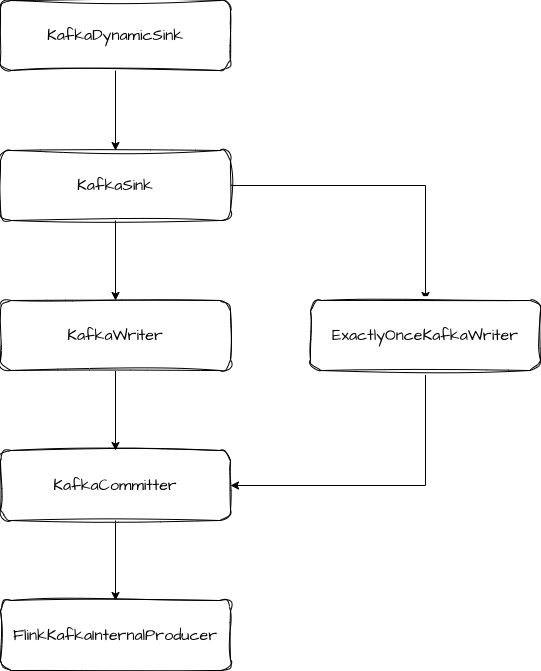
KafkaSink 类实现了 TwoPhaseCommittingStatefulSink 接口,即支持两阶段提交。它创建了 KafkaWrter 和 KafkaCommiter。
创建 KafkaWriter 时,如果配置的是 ExactlyOnce 模式,则会创建出 ExactlyOnceKafkaWriter,否则创建 KafkaWriter。Writer 真正实现两阶段提交的是 ExactlyOnceKafkaWriter。它在启动时,会调用 producer.beginTransaction 开启一个事务。数据写入时会调用 KafkaWriter.write 方法,此操作会被标记为事务内的操作。当 Sink 收到 Barrier 时,会先调用 flush 方法,将缓冲区的数据都发送到 Kafka Broker,然后调用 prepareCommit 方法预提交。预提交方法中记录 epoch 和 transactionalId 返回给框架层。- public Collection prepareCommit() { // only return a KafkaCommittable if the current transaction has been written some data if (currentProducer.hasRecordsInTransaction()) { KafkaCommittable committable = KafkaCommittable.of(currentProducer); LOG.debug("Prepare {}.", committable); currentProducer.precommitTransaction(); return Collections.singletonList(committable); } // otherwise, we recycle the producer (the pool will reset the transaction state) producerPool.recycle(currentProducer); return Collections.emptyList();}
- public List snapshotState(long checkpointId) throws IOException { // recycle committed producers TransactionFinished finishedTransaction; while ((finishedTransaction = backchannel.poll()) != null) { producerPool.recycleByTransactionId( finishedTransaction.getTransactionId(), finishedTransaction.isSuccess()); } // persist the ongoing transactions into the state; these will not be aborted on restart Collection ongoingTransactions = producerPool.getOngoingTransactions(); currentProducer = startTransaction(checkpointId + 1); return createSnapshots(ongoingTransactions);}private List createSnapshots( Collection ongoingTransactions) { List states = new ArrayList(); int[] subtaskIds = this.ownedSubtaskIds; for (int index = 0; index < subtaskIds.length; index++) { int ownedSubtask = subtaskIds[index]; states.add( new KafkaWriterState( transactionalIdPrefix, ownedSubtask, totalNumberOfOwnedSubtasks, transactionNamingStrategy.getOwnership(), // new transactions are only created with the first owned subtask id index == 0 ? ongoingTransactions : List.of())); } LOG.debug("Snapshotting state {}", states); return states;}
FlinkKafkaInternalProducer 是 Flink 内部封装的与 Kafka 生产者的交互类,所有与 Kafka 生产者的交互都通过它执行。
关于 Kafka Connector 的 Sink 端的源码我们就梳理到这里。
总结
最后还是总结一下。本文我们先了解了 Flink 中自定义 Source 和 Sink 的流程。按照这个流程,我们梳理了 Kafka Connector 的源码。在 Source 端,Flink Kafka 封装了对消费者 Offset 的提交逻辑。在 Sink 端结合了 Kafka 提供的事务支持实现了两阶段提交的逻辑。
来源:程序园用户自行投稿发布,如果侵权,请联系站长删除
免责声明:如果侵犯了您的权益,请联系站长,我们会及时删除侵权内容,谢谢合作! |


 提升卡
提升卡 置顶卡
置顶卡 沉默卡
沉默卡 喧嚣卡
喧嚣卡 变色卡
变色卡 千斤顶
千斤顶 照妖镜
照妖镜